100% Local Calendar Processing • Zero Battery Drain • Instant Relief

Never miss another meeting because you were in the zone.

Standard calendar notifications fade away after 5 seconds. Meeting Ringer pops up an unmissable incoming call banner over your active screen and rings until you click Join.

Free personal tier No credit card required Verified by Apple & Microsoft
AUDIO COMPARISON Click below to hear why standard pings fail vs. persistent alarm
💡 When Meeting Ringer rings, click Join above to disarm!
The 3-Step Reality

Built for deep focus, not clock-watching.

Standard calendar alerts expect you to keep one eye on the clock all day. Meeting Ringer takes over the watch, cuts through distractions when it matters, and gets you into calls without friction.

Step 01 Peace of Mind

Forget about the clock. Go deep into your work.

When you're in the zone, time vanishes. Stop breaking your concentration every five minutes just to check if you have a call coming up. Meeting Ringer watches your calendar in the background so you can pour 100% of your attention into your work without fear of running late.

  • 100% local calendar privacy — Your schedule, meeting titles, attendees, and notes stay strictly on your device. Your calendar data is never sent to external servers.
  • Zero slowdown, zero battery drain — Sits whisper-quiet in your system tray without heating up your laptop or spinning loud fans.
  • Lose the constant check-in anxiety — Put your headphones on, close background tabs, and immerse completely in your work.
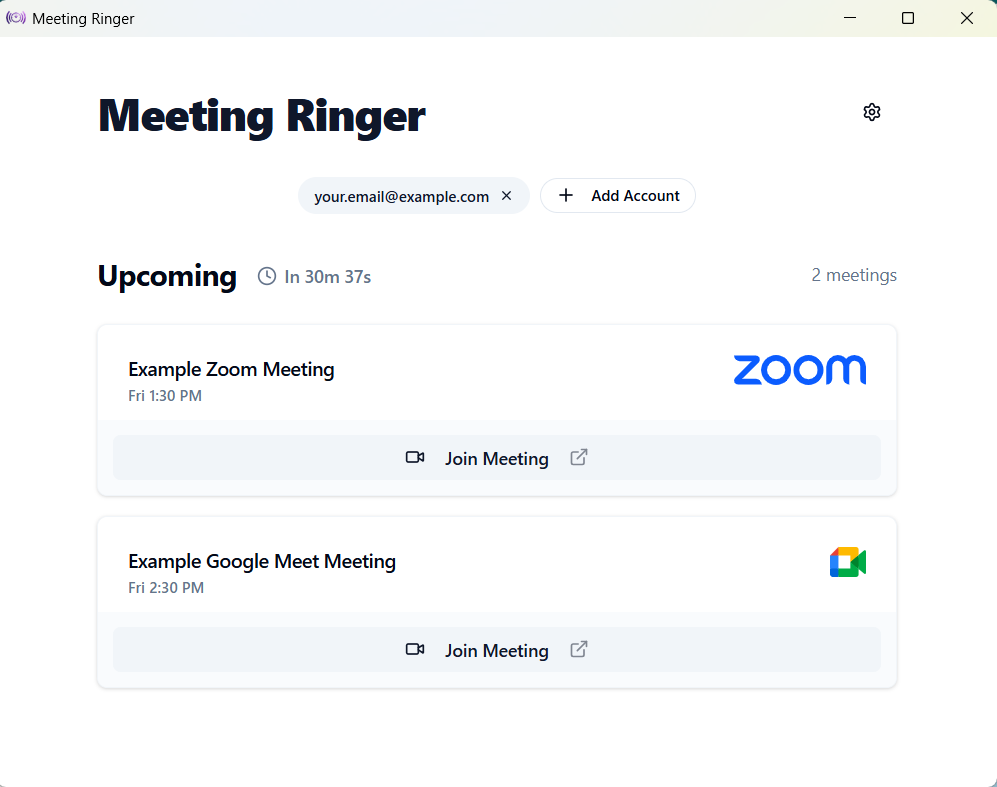
Meeting Ringer — Local Schedule View
Active
Meeting Ringer desktop schedule view displaying upcoming meetings and focus timeline
Step 02 Acoustic Authority

Never get that dreaded “Are you joining?” message again.

Quiet calendar pings slide away into notification centers while you're focused. Meeting Ringer doesn't ask politely—it pops up right over whatever you're working on and rings aloud like an incoming phone call. You can't miss it, you can't tune it out, and your team never has to sit waiting for you.

  • Persistent ringing tone — Commands your attention until actively acknowledged. Cuts through headphones and noise.
  • Floats over full-screen IDEs & apps — Displays on top of active code editors, browser tabs, and secondary screens.
  • Eliminates meeting guilt — Protects your professional reputation with clients, managers, and teammates.
Incoming Call Banner — Docked at Top of Screen
Ringing
Unmissable persistent incoming meeting call banner docked at the top center of a MacBook workspace
Step 03 Frictionless Transition

One click to join. Zero tab-hunting panic.

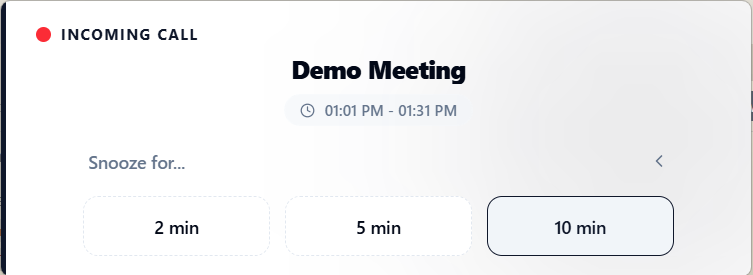
When your meeting is ready, the direct video link is already right there on your screen. Click Join and you're instantly in the room. In the middle of an important sentence or code commit? Hit Snooze for 2, 5, or 10 minutes to wrap up calmly before jumping on camera.

  • 1-click instant join — Direct launch into Google Meet, Zoom, and Microsoft Teams without searching through 30 browser tabs.
  • Graceful snooze control — Hit 2m, 5m, or 10m to commit code or jot down your final thought without showing up flustered.
  • Zero link-hunting scramble — Passcodes, dial-ins, and direct meeting URLs are automatically extracted for you.
Meeting Ringer — 1-Click Join & Snooze
Ready
Meeting Ringer call banner showing 1-click Join button and expanded 2m, 5m, 10m snooze options
Failure Analysis

You’re not absent-minded. Notification systems were never built for deep work.

When you're completely focused, polite little pings don't stand a chance. Here's why your current setup keeps letting you down.

Setup / Approach What you rely on today
Auditory Alert
Cuts through noise?
Screen Presence
Over full-screen apps?
Focus Mode / DND
Silently swallowed?
Joining Speed
Tab-hunting scramble?
The Deep Work Result Impact on your schedule
Default OS System
Standard Calendar Alerts

0.3s faint ping, hides in 5s, buried by full screen

Single 0.3s chime

Faint polite ping plays once; instantly masked by headphones, Spotify, or ambient noise.

Hides after 5 seconds

Slides into Notification Center quietly; completely hidden behind full-screen IDEs and apps.

Silently swallowed

OS Focus Mode and Do Not Disturb silently suppress alerts without any sound or visual banner.

Manual calendar search

Must minimize work, launch calendar app, open invite, and hunt down the video link.

Late to 1 in 5 meetings

“Polite notifications were built for casual email, not intense deep work.”

Phone Workaround
Phone Alarms & Timers

Daily manual chores, misses rescheduled meetings, no PC link

Muted on silent switch

Loud ringtone, but frequently silenced by physical mute rockers or left in another room.

0% screen visibility

Screen lights up face-down on your desk; completely absent from your active desktop display.

Phone focus trap

Muted if phone focus is active; operates completely detached from your computer's schedule.

No link to computer

Requires manual programming every morning; completely blind to rescheduled or moved meetings.

High manual chore

“Doesn't sync with your computer screen or provide a 1-click video call join.”

Browser Workaround
Browser Tabs & Extensions

Browsers sleep tabs to save RAM, alarms fail to fire

Silenced by memory savers

Modern Chromium browsers freeze and discard inactive background tabs to reduce memory usage.

Lost in 30 open tabs

Small browser notifications get auto-dismissed, buried behind windows, or missed entirely.

Blocked by permissions

Blocked by browser notification permission prompts and OS alert silencing rules.

Tab freeze & reload lag

Clicking opens yet another browser tab; video service lags while reloading memory-discarded tabs.

Fails when tabs sleep

“Browsers discard inactive background tabs to save memory, killing your reminders.”

Built for Deep Work
Meeting Ringer

Unmissable call banner, persistent ring, 1-click direct join

Persistent phone-call ring

Rings aloud like an incoming call until you actively answer or snooze. Cuts through headphones.

Top-level floating banner

Always visible on top of full-screen IDEs, Figma canvases, terminals, and secondary monitors.

Priority call breakthrough

Rings on time regardless of focus state; never silently swallowed into a notification tray.

1-Click instant join + snooze

Direct launch into Meet, Zoom & Teams. 1-tap 2m/5m/10m snooze to wrap up thoughts calmly.

100% Reliable Guarantee

“Never miss a meeting again. Deep focus without constant clock-watching anxiety.”

Default OS System Late to 1 in 5 meetings

Standard Calendar Alerts

0.3s faint ping, hides in 5s, buried by full screen

Auditory Alert Single 0.3s chime

Faint polite ping plays once; instantly masked by headphones, Spotify, or ambient noise.

Screen Presence Hides after 5 seconds

Slides into Notification Center quietly; completely hidden behind full-screen IDEs and apps.

Focus Mode / DND Silently swallowed

OS Focus Mode and Do Not Disturb silently suppress alerts without any sound or visual banner.

Joining Speed Manual calendar search

Must minimize work, launch calendar app, open invite, and hunt down the video link.

Polite notifications were built for casual email, not intense deep work.

Phone Workaround High manual chore

Phone Alarms & Timers

Daily manual chores, misses rescheduled meetings, no PC link

Auditory Alert Muted on silent switch

Loud ringtone, but frequently silenced by physical mute rockers or left in another room.

Screen Presence 0% screen visibility

Screen lights up face-down on your desk; completely absent from your active desktop display.

Focus Mode / DND Phone focus trap

Muted if phone focus is active; operates completely detached from your computer's schedule.

Joining Speed No link to computer

Requires manual programming every morning; completely blind to rescheduled or moved meetings.

Doesn't sync with your computer screen or provide a 1-click video call join.

Browser Workaround Fails when tabs sleep

Browser Tabs & Extensions

Browsers sleep tabs to save RAM, alarms fail to fire

Auditory Alert Silenced by memory savers

Modern Chromium browsers freeze and discard inactive background tabs to reduce memory usage.

Screen Presence Lost in 30 open tabs

Small browser notifications get auto-dismissed, buried behind windows, or missed entirely.

Focus Mode / DND Blocked by permissions

Blocked by browser notification permission prompts and OS alert silencing rules.

Joining Speed Tab freeze & reload lag

Clicking opens yet another browser tab; video service lags while reloading memory-discarded tabs.

Browsers discard inactive background tabs to save memory, killing your reminders.

Built for Deep Work 100% Reliable Guarantee

Meeting Ringer

Unmissable call banner, persistent ring, 1-click direct join

Auditory Alert Persistent phone-call ring

Rings aloud like an incoming call until you actively answer or snooze. Cuts through headphones.

Screen Presence Top-level floating banner

Always visible on top of full-screen IDEs, Figma canvases, terminals, and secondary monitors.

Focus Mode / DND Priority call breakthrough

Rings on time regardless of focus state; never silently swallowed into a notification tray.

Joining Speed 1-Click instant join + snooze

Direct launch into Meet, Zoom & Teams. 1-tap 2m/5m/10m snooze to wrap up thoughts calmly.

Never miss a meeting again. Deep focus without constant clock-watching anxiety.

Knowledge Hub & Diagnostics

Diagnosing why your current alerts keep failing?

Explore our step-by-step diagnostic guides for fixing OS notification timeouts, focus mode suppression, and browser throttling:

Peace-of-Mind Guarantee

Engineered for focus. Zero system compromise.

We built Meeting Ringer as a lean desktop utility that stays completely out of your way until it's time to act.

Zero Lag

Won't slow down your computer

Uses virtually no memory and zero background CPU. Built as an ultralight native desktop app that keeps your computer blazing fast with zero lag.

Zero Drain

Won't drain your laptop battery

Sleeps quietly in your system tray until seconds before your meeting. No constant polling, no heavy background activity, and no spinning laptop fans.

100% Local Calendar

Private on-device calendar processing

Your calendar and meeting data never leave your device. Meeting titles, attendees, and join links are read locally on your computer. Your schedule is never sent to external servers.

Verified & Safe

Verified by Apple & Microsoft

Officially notarized by Apple for macOS and certified with Microsoft Authenticode for Windows. Installs cleanly and runs safely on your workstation.

Test-drive Meeting Ringer on your next meeting in 60 seconds. No account creation or credit card required.
Download Free App
Real Stories • Real Relief

Built for people who cannot afford to be late.

From deep-focus engineers to busy founders, see how professionals reclaimed their peace of mind.

4.9 / 5.0
Professional Satisfaction
Rated by deep-focus builders
10,000+
Meetings Protected
Zero missed client calls
100% Local
Calendar Data Privacy
Schedule processed on-device
Zero Lag
Ultralight Footprint
Zero battery drain or fan noise
Deep Work & Flow
“I used to set three separate alarms on my phone just to make sure I didn’t miss morning standup while deep in code. Now I put my headphones on, close Slack, and just build. It rings, I click Join, and I’m there.”
Deep Work Punctuality Guide
David M. — Senior Backend Engineer

David M.

Verified User

Senior Backend Engineer

macOS • Go & Kubernetes
High-Stakes Client Demos
“Showing up 4 minutes late to a prospect demo is the worst first impression possible. Meeting Ringer is the only app that actually breaks through my multi-monitor setup and demands my attention.”
Ring Calendar Like a Phone Call
Elena R. — Head of Sales & Partnerships

Elena R.

Verified User

Head of Sales & Partnerships

Windows 11 • Zoom & Teams
ADHD & Time Blindness
“If you struggle with hyperfocus or time blindness, you know the guilt of looking at the clock and seeing 2:07 PM when your meeting started at 2:00. This single app eliminated an enormous source of daily stress.”
ADHD & Time Blindness Guide
Marcus T. — Product Designer

Marcus T.

Verified User

Product Designer

macOS • Figma & Meet

Never apologize for being late again.

Install in under 60 seconds. Runs 100% locally on your machine with zero battery drain and private calendar processing.

Try Meeting Ringer Free

Free for personal emails • 14-day trial for work domains

Simple, Honest Pricing

Peace of mind for less than a cup of coffee per year.

Free for personal emails. Just $1/month for work domains. No credit card required to download and test on your real meetings.

Personal Email

Free

For freelancers, students, job seekers, and personal calendar management.

$ 0

No credit card or payment info required

Supported personal emails:
@gmail.com@outlook.com@proton.me@icloud.com

Also supports Yahoo, Hotmail, and all standard consumer webmail providers.

What's included:

  • Unlimited persistent meeting rings
  • 1-click instant join for Google Meet, Zoom, & Teams
  • 100% private calendar data — zero calendar events uploaded
  • Priority full-screen breakthrough over IDEs & full-screen apps
  • Customizable loud chimes & snooze timers (2m, 5m, 10m)
  • Zero battery drain & zero PC slowdown
  • No credit card or account creation required
Download Free App

Free for personal emails • No credit card required

Try it free on real meetings. No credit card required to download.

Experience the calm of deep flow without clock-checking anxiety. Install in 60 seconds and disarm your very next meeting.

60-second setup
No account creation
Cancel anytime in 1 click
Frequently Asked Questions

Clear answers to common questions.

Everything you need to know about privacy, performance, platform support, and our generous trial.

Does Meeting Ringer read or store my emails or meeting notes?

No. Meeting Ringer has zero access to your email inbox, messages, drafts, or private meeting notes. It only inspects your locally synchronized calendar events to check the start time and the video join link (Google Meet, Zoom, or Microsoft Teams). All schedule parsing runs 100% locally on your computer—your calendar events and meeting links are never uploaded to our servers. Our servers are only used for account authentication, syncing your app preferences, managing subscriptions, and anonymous reliability metrics.

Will it slow down my computer or drain my laptop battery?

No. Meeting Ringer is designed from the ground up to never slow down your computer or drain battery. Unlike heavy browser tabs or bloated background apps, it sleeps quietly in your system tray and only activates seconds before your meeting. Your laptop fans won't spin up, your battery won't drain, and your computer stays fast and responsive.

What video conferencing platforms and calendar apps work?

Google Meet, Zoom, and Microsoft Teams meeting links are fully auto-detected out of the box. When your alarm rings, a single click on 'Join' instantly opens the meeting in your default browser or native app. Meeting Ringer connects seamlessly with Google Calendar (with Microsoft Outlook support in development) on macOS, Windows, and Linux.

How does the free trial work for work emails?

You can download Meeting Ringer and test-drive it on your first real meetings immediately without entering any credit card or creating a payment profile. Once you verify that it keeps you on time, you continue with a full 14-day unrestricted free trial. If you love it, it's just $1/month billed annually ($12/year). If not, the app simply stops ringing—there are no unexpected charges, no forced subscriptions, and no cancellation hassle.

Why is Meeting Ringer free for personal emails?

We believe students, job applicants, freelancers, and individuals managing personal life appointments should never miss important moments due to quiet, easily missed system notifications. By charging companies a nominal $12/year for commercial domain usage, we sustainably fund development and maintenance while keeping the tool completely free for personal use.

How easy is it to expense the $12/year fee to my company?

It takes less than a minute. Upon billing after your 14-day free trial, you receive an itemized, tax-compliant PDF invoice and receipt. At just $12/year ($1/month), it falls well under virtually every company's discretionary expense allowance and can be submitted directly through Expensify, Concur, Rippling, Brex, or Ramp.

Ready To Focus Without Fear

Never miss another meeting because you were in the zone.

Download Meeting Ringer today. Free for personal use, no credit card or account required.

Free personal tier 100% private calendar data Verified by Apple & Microsoft
All Platforms: macOS Windows 10/11 Linux iOS & Android